' d='M71 0.33c-25 1 -45.67 12.67 -59.33 33c-4.67 7 -7 12.67 -9.33 21.33c-2.33 8.33 -2 1.33 -2.33 111c0 103.33 0 104 1.33 111.33c1.67 8.33 6.33 19.67 11 26.67c8.33 12.33 22.33 23 36.33 27.67c4.67 1.67 15.33 3.67 20.33 4c6 0.33 227.33 0.33 234 0c10.67 -0.67 23 -4.33 32 -9.33c9 -5 19 -14 24.33 -22c5 -7.67 7.33 -12.67 9.67 -20.33c1.67 -5.67 2.33 -9 2.67 -15.67c0.33 -7.67 0.33 -196 0 -201c-1 -11.33 -3.67 -20 -10.33 -31.33c-3 -5.33 -5 -8 -8.33 -11.33c-11.33 -12 -24.67 -19.67 -40 -22.67c-2.67 -0.67 -6.33 -1 -7.67 -1.33c-4.33 0 -228.33 -0.33 -234.33 0z'/%3E %3Cpath fill='%23FFFFFF' d='M357 33.33c-0.67 0 -2.33 0.67 -3.67 1.33c-1.33 0.33 -3.67 1.33 -5 2c-1.33 0.33 -3.67 1.33 -5 2c-1.67 0.67 -4.67 1.67 -6.67 2.67c-12 4.33 -11.67 4 -19.33 7.33c-1.33 0.67 -3.67 1.33 -5 2c-1.67 0.67 -3.67 1.33 -5.33 2c-1.33 0.67 -4.33 1.67 -6.33 2.67c-10 3.67 -12 4.33 -14.33 5.33c-1.67 0.67 -4.67 1.67 -6.67 2.33c-2 1 -5 2 -6.33 2.67c-1.67 0.67 -6 2.33 -9.67 3.33c-3.67 1.33 -8 3 -9.33 3.67c-3.33 1.33 -8.67 3.33 -16 6c-3 1 -7.33 2.67 -9.67 3.33c-2.33 1 -6.67 2.67 -9.33 3.67c-3 1 -7.33 2.67 -9.33 3.33c-2.33 1 -6 2.33 -8.33 3.33c-2.33 0.67 -7.33 2.33 -11 3.67c-3.67 1.33 -8 3 -9.33 3.67c-1.67 0.67 -6 2.33 -9.67 3.67c-3.67 1.33 -8.67 3 -11 3.67c-2.33 1 -6.67 2.67 -9.33 3.67c-3 1 -7.33 2.67 -9.67 3.33c-2.33 1 -5.67 2.33 -7.67 3c-2 0.67 -4.33 1.67 -5 2c-4.33 2.33 -9 6.33 -11.67 10c-2.67 4 -3 5.33 -5 12.33c-0.67 2.33 -0.67 7.33 -0.33 9.33c1.67 6.33 2.33 7.33 3.67 9.67c2 2.67 8.33 9.33 10.67 11c0.67 0.67 2 1.67 2.67 2.33c0.67 0.33 2 1.67 3 2.33c3.33 2.33 5.33 4 7.67 5.67c1.33 1 3 2.33 4 3c3.33 2.33 8.33 8 9.67 10.67l1.33 2.33l0 5c0 6.67 -1.33 10 -6 14.67c-2.33 2 -8 5.33 -11.33 6.33c-1 0.33 -2.33 1 -3.67 1.33c-1.33 0.67 -2.67 1.33 -3.33 1.67c-1 0.33 -2.33 1 -3.33 1.33c-1 0.67 -3 1.33 -4.33 2c-1 0.33 -3 1 -4.33 1.33c-1 0.67 -2.67 1.33 -3.67 1.67c-1 0.67 -2.67 1.33 -4 2c-1 0.33 -3 1 -4.33 1.67c-1 0.33 -3 1 -4 1.67c-1 0.33 -2.33 1 -3 1.33c-1 0.33 -2.33 1 -3.67 1.33c-1.33 0.67 -2.67 1.33 -3.33 1.67c-1 0.33 -2.33 1 -3.33 1.33c-1 0.67 -3 1.33 -4 1.67c-1.33 0.67 -3.33 1.33 -4.67 2c-5.67 2.33 -8 3 -10 4c-1 0.33 -3 1 -4 1.67c-1 0.33 -2.33 1 -3 1.33c-1 0.33 -2.33 1 -3.33 1.33c-1 0.67 -3 1.33 -4 1.67c-1.33 0.67 -3.33 1.33 -4.67 2c-1.67 0.67 -3.67 1.33 -5 2c-1 0.33 -2.67 1 -3.67 1.67c-1 0.33 -2.67 1 -3.67 1.33c-1.33 0.67 -3.33 1.33 -4.67 2c-5.67 2.33 -8 3 -10 4c-1 0.33 -3 1 -4 1.67c-1 0.33 -2.33 1 -3 1.33c-1 0.33 -2.33 1 -3.33 1.33c-1.33 0.67 -3 1.33 -3.67 1.67c-3.33 1 -7 2.67 -7.33 3.33c-1 1 0 4.33 3.33 12c1.33 2.33 2.67 5.33 3.33 6.33c1.67 2.33 2.67 2.67 6 1c1 -0.67 2.67 -1.33 3.67 -1.67c0.67 -0.33 2 -1 3 -1.33c1.33 -0.67 3.67 -1.67 5.67 -2.33c2 -0.67 4.67 -1.67 6.33 -2.33c1.33 -0.67 3.67 -1.33 5 -2c1.33 -0.67 3.33 -1.33 4.67 -2c1.33 -0.67 3.67 -1.33 5.33 -2c1.33 -0.67 4.33 -1.67 6.33 -2.67c3.67 -1 5.33 -1.67 11.67 -4.33c3 -1.33 9 -3.67 14 -5.33c2 -0.67 4.33 -1.67 5.33 -2c1 -0.67 3.33 -1.67 5.33 -2.33c2 -0.67 5.33 -2 7.67 -3c2.33 -0.67 6.67 -2.33 9.67 -3.33c3 -1 7.67 -3 10.67 -4c3 -1 7.33 -2.67 9.67 -3.33c2 -1 5.67 -2.33 8 -3.33c5.33 -1.67 15.33 -5.33 28 -9.67c5.33 -2 11.67 -4.33 14 -5c2.33 -1 8 -3 12.67 -4.67c19 -6.67 25.33 -9 29 -10.33c4.33 -1.67 10.33 -4.67 12.33 -6c0.67 -0.67 2.33 -1.67 3 -2.33c2.67 -2 7.33 -9.67 8.67 -14.33c0.33 -0.67 0.67 -2 1 -3c0.33 -2 0.33 -8 0 -10c-2 -7 -2 -7 -5 -11.67c-1.67 -2.33 -3.33 -4.67 -4 -5c-1.67 -1.67 -3.67 -3 -5.67 -4.33c-1 -0.67 -2 -1.67 -2.33 -2c-0.67 -0.33 -1.67 -1.33 -2.67 -2c-1 -0.67 -2.33 -1.67 -3 -2.67c-0.67 -0.67 -2 -1.67 -3 -2.33c-3 -2.33 -5.67 -4 -7 -5.33c-1 -0.67 -2.33 -1.67 -3 -2.33c-2.67 -2 -6 -8 -6 -10.67c0 -0.67 -0.33 -2 -0.67 -3c-0.33 -1.67 -0.33 -1.67 0 -3.33c0.33 -1 0.67 -2.33 0.67 -2.67c0 -0.67 3 -7 4 -8.33c2 -2 8 -5.67 12.67 -7.33c1.33 -0.67 3.33 -1.33 4.33 -1.67c1.33 -0.67 3.67 -1.67 5 -2.33c1.33 -0.67 3.67 -1.67 4.67 -2c1.33 -0.67 3.33 -1.33 5 -2c1.33 -0.67 3.33 -1.33 4.67 -2c1 -0.33 3 -1 4 -1.67c1 -0.33 2.33 -1 3.33 -1.33c0.67 -0.33 2 -1 3.33 -1.33c1.33 -0.67 3.33 -1.67 5 -2.33c1.67 -0.33 3.67 -1.33 5 -2c1.33 -0.33 2.67 -1 3.67 -1.33c0.67 -0.33 2 -1 3 -1.33c1 -0.67 3 -1.33 4 -1.67c2 -1 4.33 -1.67 10 -4c1.33 -0.67 3.33 -1.33 4.67 -2c1 -0.33 3 -1 4 -1.67c1 -0.33 3 -1.33 4.67 -2c1.67 -0.33 3.67 -1.33 4.67 -1.67c1 -0.67 3 -1.33 4 -1.67c1.33 -0.67 3.33 -1.33 4.67 -2c5.67 -2.33 8 -3 10 -4c1 -0.33 2.67 -1 3.67 -1.67c1 -0.33 3.33 -1.33 5.33 -2c2 -0.67 4.67 -1.67 6.33 -2.33c1.33 -0.67 3.33 -1.33 4.67 -2c1 -0.33 2.67 -1 3.67 -1.33c1 -0.67 2.67 -1.33 3.67 -1.67c1.33 -0.67 3.33 -1.33 4.67 -2c1.67 -0.67 3.67 -1.33 5.33 -2c1.33 -0.67 3.33 -1.33 4.67 -2c4.33 -1.67 4.33 -2.33 0.67 -10.67c-1 -2.33 -2.67 -5.33 -3.67 -7.33c-2.33 -3.67 -3 -4.33 -5 -3.33z'/%3E %3Cg clip-path='url(%23rimb)'%3E %3Cpath d='M357 33.33c-0.67 0 -2.33 0.67 -3.67 1.33c-1.33 0.33 -3.67 1.33 -5 2c-1.33 0.33 -3.67 1.33 -5 2c-1.67 0.67 -4.67 1.67 -6.67 2.67c-12 4.33 -11.67 4 -19.33 7.33c-1.33 0.67 -3.67 1.33 -5 2c-1.67 0.67 -3.67 1.33 -5.33 2c-1.33 0.67 -4.33 1.67 -6.33 2.67c-10 3.67 -12 4.33 -14.33 5.33c-1.67 0.67 -4.67 1.67 -6.67 2.33c-2 1 -5 2 -6.33 2.67c-1.67 0.67 -6 2.33 -9.67 3.33c-3.67 1.33 -8 3 -9.33 3.67c-3.33 1.33 -8.67 3.33 -16 6c-3 1 -7.33 2.67 -9.67 3.33c-2.33 1 -6.67 2.67 -9.33 3.67c-3 1 -7.33 2.67 -9.33 3.33c-2.33 1 -6 2.33 -8.33 3.33c-2.33 0.67 -7.33 2.33 -11 3.67c-3.67 1.33 -8 3 -9.33 3.67c-1.67 0.67 -6 2.33 -9.67 3.67c-3.67 1.33 -8.67 3 -11 3.67c-2.33 1 -6.67 2.67 -9.33 3.67c-3 1 -7.33 2.67 -9.67 3.33c-2.33 1 -5.67 2.33 -7.67 3c-2 0.67 -4.33 1.67 -5 2c-4.33 2.33 -9 6.33 -11.67 10c-2.67 4 -3 5.33 -5 12.33c-0.67 2.33 -0.67 7.33 -0.33 9.33c1.67 6.33 2.33 7.33 3.67 9.67c2 2.67 8.33 9.33 10.67 11c0.67 0.67 2 1.67 2.67 2.33c0.67 0.33 2 1.67 3 2.33c3.33 2.33 5.33 4 7.67 5.67c1.33 1 3 2.33 4 3c3.33 2.33 8.33 8 9.67 10.67l1.33 2.33l0 5c0 6.67 -1.33 10 -6 14.67c-2.33 2 -8 5.33 -11.33 6.33c-1 0.33 -2.33 1 -3.67 1.33c-1.33 0.67 -2.67 1.33 -3.33 1.67c-1 0.33 -2.33 1 -3.33 1.33c-1 0.67 -3 1.33 -4.33 2c-1 0.33 -3 1 -4.33 1.33c-1 0.67 -2.67 1.33 -3.67 1.67c-1 0.67 -2.67 1.33 -4 2c-1 0.33 -3 1 -4.33 1.67c-1 0.33 -3 1 -4 1.67c-1 0.33 -2.33 1 -3 1.33c-1 0.33 -2.33 1 -3.67 1.33c-1.33 0.67 -2.67 1.33 -3.33 1.67c-1 0.33 -2.33 1 -3.33 1.33c-1 0.67 -3 1.33 -4 1.67c-1.33 0.67 -3.33 1.33 -4.67 2c-5.67 2.33 -8 3 -10 4c-1 0.33 -3 1 -4 1.67c-1 0.33 -2.33 1 -3 1.33c-1 0.33 -2.33 1 -3.33 1.33c-1 0.67 -3 1.33 -4 1.67c-1.33 0.67 -3.33 1.33 -4.67 2c-1.67 0.67 -3.67 1.33 -5 2c-1 0.33 -2.67 1 -3.67 1.67c-1 0.33 -2.67 1 -3.67 1.33c-1.33 0.67 -3.33 1.33 -4.67 2c-5.67 2.33 -8 3 -10 4c-1 0.33 -3 1 -4 1.67c-1 0.33 -2.33 1 -3 1.33c-1 0.33 -2.33 1 -3.33 1.33c-1.33 0.67 -3 1.33 -3.67 1.67c-3.33 1 -7 2.67 -7.33 3.33c-1 1 0 4.33 3.33 12c1.33 2.33 2.67 5.33 3.33 6.33c1.67 2.33 2.67 2.67 6 1c1 -0.67 2.67 -1.33 3.67 -1.67c0.67 -0.33 2 -1 3 -1.33c1.33 -0.67 3.67 -1.67 5.67 -2.33c2 -0.67 4.67 -1.67 6.33 -2.33c1.33 -0.67 3.67 -1.33 5 -2c1.33 -0.67 3.33 -1.33 4.67 -2c1.33 -0.67 3.67 -1.33 5.33 -2c1.33 -0.67 4.33 -1.67 6.33 -2.67c3.67 -1 5.33 -1.67 11.67 -4.33c3 -1.33 9 -3.67 14 -5.33c2 -0.67 4.33 -1.67 5.33 -2c1 -0.67 3.33 -1.67 5.33 -2.33c2 -0.67 5.33 -2 7.67 -3c2.33 -0.67 6.67 -2.33 9.67 -3.33c3 -1 7.67 -3 10.67 -4c3 -1 7.33 -2.67 9.67 -3.33c2 -1 5.67 -2.33 8 -3.33c5.33 -1.67 15.33 -5.33 28 -9.67c5.33 -2 11.67 -4.33 14 -5c2.33 -1 8 -3 12.67 -4.67c19 -6.67 25.33 -9 29 -10.33c4.33 -1.67 10.33 -4.67 12.33 -6c0.67 -0.67 2.33 -1.67 3 -2.33c2.67 -2 7.33 -9.67 8.67 -14.33c0.33 -0.67 0.67 -2 1 -3c0.33 -2 0.33 -8 0 -10c-2 -7 -2 -7 -5 -11.67c-1.67 -2.33 -3.33 -4.67 -4 -5c-1.67 -1.67 -3.67 -3 -5.67 -4.33c-1 -0.67 -2 -1.67 -2.33 -2c-0.67 -0.33 -1.67 -1.33 -2.67 -2c-1 -0.67 -2.33 -1.67 -3 -2.67c-0.67 -0.67 -2 -1.67 -3 -2.33c-3 -2.33 -5.67 -4 -7 -5.33c-1 -0.67 -2.33 -1.67 -3 -2.33c-2.67 -2 -6 -8 -6 -10.67c0 -0.67 -0.33 -2 -0.67 -3c-0.33 -1.67 -0.33 -1.67 0 -3.33c0.33 -1 0.67 -2.33 0.67 -2.67c0 -0.67 3 -7 4 -8.33c2 -2 8 -5.67 12.67 -7.33c1.33 -0.67 3.33 -1.33 4.33 -1.67c1.33 -0.67 3.67 -1.67 5 -2.33c1.33 -0.67 3.67 -1.67 4.67 -2c1.33 -0.67 3.33 -1.33 5 -2c1.33 -0.67 3.33 -1.33 4.67 -2c1 -0.33 3 -1 4 -1.67c1 -0.33 2.33 -1 3.33 -1.33c0.67 -0.33 2 -1 3.33 -1.33c1.33 -0.67 3.33 -1.67 5 -2.33c1.67 -0.33 3.67 -1.33 5 -2c1.33 -0.33 2.67 -1 3.67 -1.33c0.67 -0.33 2 -1 3 -1.33c1 -0.67 3 -1.33 4 -1.67c2 -1 4.33 -1.67 10 -4c1.33 -0.67 3.33 -1.33 4.67 -2c1 -0.33 3 -1 4 -1.67c1 -0.33 3 -1.33 4.67 -2c1.67 -0.33 3.67 -1.33 4.67 -1.67c1 -0.67 3 -1.33 4 -1.67c1.33 -0.67 3.33 -1.33 4.67 -2c5.67 -2.33 8 -3 10 -4c1 -0.33 2.67 -1 3.67 -1.67c1 -0.33 3.33 -1.33 5.33 -2c2 -0.67 4.67 -1.67 6.33 -2.33c1.33 -0.67 3.33 -1.33 4.67 -2c1 -0.33 2.67 -1 3.67 -1.33c1 -0.67 2.67 -1.33 3.67 -1.67c1.33 -0.67 3.33 -1.33 4.67 -2c1.67 -0.67 3.67 -1.33 5.33 -2c1.33 -0.67 3.33 -1.33 4.67 -2c4.33 -1.67 4.33 -2.33 0.67 -10.67c-1 -2.33 -2.67 -5.33 -3.67 -7.33c-2.33 -3.67 -3 -4.33 -5 -3.33z' fill='none' stroke='url(%23fileteInv)' stroke-width='3.65'/%3E %3C/g%3E %3Cg clip-path='url(%23rim)'%3E %3Cpath d='M71 0.33c-25 1 -45.67 12.67 -59.33 33c-4.67 7 -7 12.67 -9.33 21.33c-2.33 8.33 -2 1.33 -2.33 111c0 103.33 0 104 1.33 111.33c1.67 8.33 6.33 19.67 11 26.67c8.33 12.33 22.33 23 36.33 27.67c4.67 1.67 15.33 3.67 20.33 4c6 0.33 227.33 0.33 234 0c10.67 -0.67 23 -4.33 32 -9.33c9 -5 19 -14 24.33 -22c5 -7.67 7.33 -12.67 9.67 -20.33c1.67 -5.67 2.33 -9 2.67 -15.67c0.33 -7.67 0.33 -196 0 -201c-1 -11.33 -3.67 -20 -10.33 -31.33c-3 -5.33 -5 -8 -8.33 -11.33c-11.33 -12 -24.67 -19.67 -40 -22.67c-2.67 -0.67 -6.33 -1 -7.67 -1.33c-4.33 0 -228.33 -0.33 -234.33 0z' fill='none' stroke='url(%23filete)' stroke-width='8.64'/%3E %3C/g%3E %3Cpath d='M1269 56l-0.67 0.67l-0.33 35c0 19 -0.33 35 -0.33 35.33c-0.67 1 -1.33 0.67 -4 -0.67c-6 -4 -14.67 -7.33 -23.67 -9c-4.33 -0.67 -15.33 -0.67 -20.67 0c-17.33 2.33 -33.33 11.67 -44.67 25.67c-10.33 13 -14.67 26.33 -14.67 44.67c-0.33 13.33 1.67 21.67 7.33 33c3.67 7 7 11.67 14.33 19c5.33 5.67 16.33 12 26.33 15.33c19.67 6.67 42.33 4 60 -6.67c10.33 -6 20 -16.33 25 -26c5 -9.67 7.33 -18.67 8 -28.33c0.33 -7 0.33 -135 0 -136.67c-0.33 -1 -0.67 -1.33 -1.33 -1.67c-0.33 -0.33 -6.67 -0.33 -15.33 -0.33c-14 0 -14.67 0 -15.33 0.67zm-31 91.33c7 1 15.33 5.33 20 10c3.67 4 8.33 11 10 15.33c2.67 8 3 20 0 28.67c-5.33 16.33 -20.33 27.33 -36.67 27.33c-11 0 -20.33 -3.67 -28.67 -11.67c-7 -6.67 -11.67 -18.33 -11.67 -29.33c0 -16 8.33 -30.33 22.67 -37.33c6.33 -3.33 16.33 -4.67 24.33 -3zM1319.33 55.67c-0.33 0 -0.67 0.67 -1 1c-0.33 1 -0.33 133.33 0 138c1 11.67 5.33 24 11 32.67c4.33 6.67 13 15.33 18.67 19c3 2 11 6 15.67 7.67c13 5.33 30.67 6 45.33 2c6 -1.67 16.33 -6.67 22.33 -10.67c4.33 -3 13 -12 16.67 -17.67c2.67 -4 4.67 -8.33 7.33 -14.33c5.33 -14.67 6 -28.67 2 -44c-3.33 -14 -8.67 -23.33 -18.67 -33.33c-13.33 -12.67 -29.67 -19 -49.33 -19c-13 0 -24.67 3.33 -34 9.33c-3.67 2.67 -4.33 2.67 -4.67 0c-0.33 -0.67 -0.33 -17 -0.33 -35.67l0.33 -34l-1 -0.67c-0.67 -0.67 -1.33 -0.67 -15 -0.67c-8 0 -14.67 0.33 -15.33 0.33zm76.33 91.67c5.67 0.67 10 2.67 15.67 6.33c5.33 3.67 8.33 7 12.33 14c3.67 6.33 4.67 10.33 5 18.33c0.33 9.67 -1.67 16.67 -7.67 25.67c-3.33 5.33 -9.67 10.33 -16.33 13.67c-8 3.67 -18.67 4.33 -27.67 1.67c-6.33 -2 -15.33 -8.33 -19 -13c-2.33 -3 -6.67 -12.33 -7.67 -16.67c-2.33 -8.33 -1 -19.33 2.67 -27.33c5.33 -11 12.33 -17.33 23 -21.33c5.33 -2 13.33 -2.67 19.67 -1.33zM1696 67.33c-8.67 2.67 -14.33 9.67 -14.33 18c0 8.67 5.67 16 13.67 18.33c2.33 0.67 7.67 0.67 10 0.33c9.67 -2.67 15.33 -12 13 -22.33c-1 -5 -4.67 -10 -9 -12.33c-4 -2 -9.67 -3 -13.33 -2zM1080.33 117.33c-7.33 1 -16.33 3.33 -22.33 6.33c-8 3.67 -19.33 13.67 -23 20c-4.33 6.67 -6.67 12.33 -8 18.33c-2.33 8.67 -2 7.33 -2.33 46.33c0 39.67 0 45.33 1 46.33l0.67 0.67l14.33 0.33c13.67 0 14.33 0 15 -0.67l1 -0.67l0 -38.67c0 -25.67 0 -39.67 0.33 -41.67c1 -7 4 -12.67 9.33 -18.33c5.33 -5.67 12.33 -8 21.67 -8c6 0 8 0.33 12.67 2.67c8.33 4.33 12 8 15.33 16c3 6.67 2.67 2.67 3 48c0 39.33 0.33 40.33 0.67 41c0.67 0.33 3.33 0.33 15 0.33c13.33 0 14 0 14.67 -0.67l1 -0.67l0 -38c0 -40 0 -43.67 -1.33 -51.33c-2.33 -12 -6.67 -20.33 -15 -29c-9.67 -9.67 -20.33 -15.33 -34 -18c-4.33 -1 -15 -1.33 -19.67 -0.67zM531.33 117.67c-16 1 -28.33 6.67 -37.67 17.33c-4.33 4.67 -6.33 9.33 -7.67 17.33c-1.67 11 1.67 21.67 8.67 29c3.33 3.33 10 8 14.33 10c5.33 2.33 16.67 6 27.67 8.33c11 2.67 16 4.67 19 7.67c5.67 5.67 3 14 -5.33 18c-7.67 4 -20 3.67 -28 -0.33c-4.67 -2.33 -9 -6.67 -12.67 -11.67c-1.33 -2.33 -2.33 -3.33 -3 -3.67c-0.33 0 -2 0.67 -6 2.33c-18.33 9.33 -19.33 9.67 -19.33 11.33c0 0.67 0.67 2.33 1.67 4.33c7.67 15 20.67 24.33 40 28.67c3.33 0.67 4.33 0.67 13.67 0.67c11.33 0 15 -0.33 23 -3c9 -3 19 -9.67 23.33 -16c8.67 -12 10.33 -26 4.67 -39c-3.67 -8.33 -7 -12 -17 -17.67c-6.33 -3.33 -15.67 -6.67 -25.67 -9c-7.33 -1.67 -17.33 -4.67 -20 -6c-4.67 -2.33 -7 -5 -7 -8.67c0 -5.33 4 -9.67 11 -11.67c3 -0.67 10.67 -0.67 13.67 0c6.67 2 11.67 5.33 15 10c1.67 2.67 2.33 3 3.33 3c1 0 20.33 -9.67 22.67 -11.67c1.33 -1 1.33 -2.33 -0.33 -5.33c-3.67 -7 -14 -16 -22.67 -19.33c-10.67 -4.33 -19.33 -5.67 -29.33 -5zM663.67 117.67c-14 1 -24.33 5 -34.33 12.33c-8 6 -10 8.33 -14.67 14.33c-10.67 14.33 -15.33 30 -14 48.67c1.67 24 16.33 46.67 37.33 57c7.33 3.67 12.33 5.33 19.33 6.33c7 1.33 18 1 25.33 -0.33c9 -1.67 20.33 -7 27.67 -12.33c5 -3.67 13.33 -13 15 -16.67c1 -2 1 -2 0.67 -3c-0.33 -0.33 -1.33 -1 -2 -1.67c-16 -9.33 -22.33 -12.67 -23.33 -12.67c-1 0 -2.33 1.33 -4 3.67c-3.33 5 -12 10.67 -19.33 12.67c-3.67 1 -14 1 -17.33 0.33c-9.67 -2.67 -18 -9 -22.67 -17.33c-1.67 -3 -3 -7 -3 -8.67c0 -2 -3.33 -1.67 49.33 -2c38.33 0 48.67 -0.33 49.33 -0.67c1.33 -0.67 1.33 -2.67 1.33 -11.33c0.33 -9.33 -0.33 -12.67 -2.67 -20.67c-3.33 -12.67 -8 -21 -16.67 -29.33c-8.33 -8.33 -19 -14.33 -29.67 -16.67c-6.67 -1.67 -15.67 -2.33 -21.67 -2zm14.33 30.67c3 0.67 9 3.67 11.67 5.67c4.33 3 8 7.33 10.33 13.33c1.33 3.67 1.67 4.33 0.67 5c-0.67 0.67 -64 1 -65 0.33c-1 -0.67 -1 -2 0.33 -5c4 -9.33 12.67 -16.67 22.67 -19.33c3.67 -1 3.67 -1 10.67 -1c5.33 0.33 7 0.33 8.67 1zM807 118c-9 1 -18.33 4 -25 7.67c-5 3 -15.67 11.33 -19 15.33c-2.67 3.33 -7.33 10.67 -9.67 14.67c-2 5 -5.33 14 -6 18.67c-1 4.67 -1.33 16 -0.67 21c1.67 14.67 6.67 26 16.67 38.33c9.33 11.33 25 20.33 39.67 22.67c14 2 28.33 1 38.33 -3c5 -2 13 -6 15.67 -8c8 -6 17.67 -17.33 17.67 -20.67c0 -1.33 -1.33 -2.33 -8.33 -6.33c-3 -1.67 -7 -4 -9 -5.33c-8 -5 -7.67 -5 -10.67 -1c-8.67 10.67 -18 15.33 -29.67 15.33c-11 0 -20.33 -4 -28.33 -11.67c-9.67 -9.67 -13.33 -24.67 -9.33 -39c3 -13 13 -23.67 25 -27.33c7 -2.33 16 -2.67 22.33 -1c7 2.33 11 4.67 16.67 10.33c3 2.67 4 3.67 4.67 3.67c1 0 7.33 -4 11 -6.67c1 -1 3.33 -2.67 5.33 -4c6.33 -3.67 7.67 -5 7.67 -6c0 -3.67 -12.33 -15 -21.33 -20c-13 -6.67 -29 -9.67 -43.67 -7.67zM938 118c-16.67 2.33 -25.67 6.33 -39 17.67c-4.33 3.67 -6.67 6.67 -11 13.33c-3.67 5.67 -5 9 -7.33 15.67c-3.33 9.33 -4 14 -3.67 24.67c0.33 12.33 2.67 20.67 9 32.33c3.33 6.33 5 9 9.33 13.33c15.67 18 40.67 25.67 65.33 20.67c7 -1.33 14.67 -4.33 22 -8.67c10.33 -6.33 21 -18.67 25.67 -30.33c3.67 -9 5.33 -16 6 -25.67c1 -14.33 -2 -27 -9 -39.33c-5.67 -9.67 -11 -15.67 -21 -23c-6.33 -4.33 -18.67 -9 -28 -10.67c-4.67 -0.67 -14 -0.67 -18.33 0zm11.67 29.67c8 1 16.33 5 21.67 10.33c6 6.33 9.67 13.33 11.33 21.67c0.67 4 0.33 14.33 -0.33 17.33c-2.67 10 -8.33 18 -16 23.33c-6 4.33 -10.67 5.67 -19.67 6.67c-11 0.67 -24.67 -6.33 -31.33 -16.33c-2.67 -4 -5.33 -10.33 -6.33 -15c-1.67 -7.33 -0.33 -18 2.33 -25c3.33 -7.67 10.33 -15.33 17.33 -19c7.33 -3.67 13.67 -5 21 -4zM1531.33 117.67c-17.33 1 -29.67 4.67 -39 12.33c-7.33 6 -11.67 11.67 -15.67 20c-2.67 5.33 -3.33 7.67 -4.33 12.67c-1.33 7.33 -1.33 10 -1.33 51.67l0.33 40.33l0.67 0.67c0.67 0.67 1.33 0.67 15 0.67c13.33 0 14.33 -0.33 15 -0.67c0.67 -0.67 0.67 -0.67 0.67 -40.67c0.33 -43.67 0 -41 2 -47c2.33 -6.33 6.33 -11.33 12 -15.33c5.33 -3.67 10 -4.67 21.33 -5.33c4.33 -0.33 5 -0.33 5.67 -0.67c0.33 -0.67 0.33 -3.33 0.33 -14c0 -16 0.33 -14.67 -4.67 -14.67c-2 -0.33 -5.67 0 -8 0zM1797 117.67c-9.67 0.33 -16 1.67 -23.67 4.67c-8.67 3.67 -12 5.67 -21.67 15c-6.33 5.67 -12.33 17 -15 26.67c-1.67 7.67 -1.67 7.67 -1.67 50.33c0 21.67 0 39.67 0 40.33c0.33 0.33 0.67 0.67 1.33 1c1.33 0.33 28 0.33 29 0c0.67 0 1 -0.67 1.33 -1c0 -0.33 0.33 -18.67 0.33 -40.33l0 -39.33l0.67 -2.67c2 -7.67 7.33 -15.33 12.67 -19c11 -7 22.33 -7.67 34.33 -1.67c5.67 3 9.67 7.33 13.33 14.33c3.33 7 3 3 3.33 48.67l0.33 40l0.67 0.67c0.67 0.67 1.33 0.67 15 0.67c13.33 0 14.33 -0.33 15 -0.67c0.33 -0.67 0.67 -2.67 0.67 -38.33c0 -39.33 0 -43 -1.33 -49.33c-2 -9.67 -6.33 -19.67 -12.67 -27c-2.33 -3.33 -9.33 -9.33 -13 -12c-3.33 -2 -9.33 -5.33 -14 -7c-6.33 -2.67 -17.67 -4.67 -25 -4zM1602.67 118c-11 1.67 -16.67 3.33 -23.67 7c-6.67 3.33 -10 5.67 -15.33 11c-6.67 6.67 -8.67 9.33 -7.33 11c0.67 0.67 5.33 4.33 11.33 8.33c2.33 1.67 5.33 3.67 6.67 4.67c2.67 1.67 3 1.67 6 -0.67c6.33 -5.33 9 -7.33 14 -9.33c7 -2.67 13.67 -3.67 20.67 -2.67c9.33 1.67 16 6 19.33 12.67c2.33 4.67 3 9.67 1.67 10.67c-1 1 -1.33 1 -21.67 1c-23.67 0.33 -25.67 0.67 -34.33 3c-3.33 1 -9.67 3.33 -11.33 4.33c-5.33 3.33 -10.67 8 -13.67 12.67c-7 10.33 -7.33 27.33 -1.33 39.67c3 6 9 12.67 14.33 16.33c10 7 21.33 10 36 9.67c12.33 -0.33 20 -2.67 29 -9c3.33 -2.33 4.33 -2.67 5 -1.67c0 0.33 0.33 2.33 0.33 4.33c0 3 0.33 3.67 0.67 4c1 0.67 11 1 21 1c9.67 -0.33 9 0.33 9 -7c0.33 -10.67 0 -79.67 -0.33 -83c-1 -6.67 -3.33 -15.67 -6 -21c-5.33 -10 -17 -19.67 -29.33 -23.67c-4 -1.33 -10 -2.67 -15 -3.33c-3.67 -0.33 -13.67 -0.33 -15.67 0zm33 79c2 1 1.33 8.67 -0.67 14.33c-2 5.33 -6.33 10.67 -10.67 13c-3 1.67 -9.67 4 -13.67 4.33c-7.67 1 -17.67 -1 -22.67 -4.67c-4.67 -3.33 -6.33 -6.33 -6.33 -12.33c0 -3.33 0 -3.67 1 -5.67c2.33 -5 8 -8.33 16.33 -9c4 -0.33 36 -0.33 36.67 0zM1686.33 122l-0.67 0.67l0 65.33c0 36 0 66 0 66.33c0.67 1.67 1.33 1.67 16.33 1.67c13.33 0 13.67 0 14.33 -0.67l1 -0.67l0 -66c0 -62.67 -0.33 -66 -0.67 -66.67c-0.67 -0.33 -1.67 -0.67 -15 -0.67c-14 0 -14.67 0 -15.33 0.67z' fill='none' stroke='%23000000' stroke-opacity='0.26' stroke-width='3.72'/%3E %3Cpath fill='%230071FC' d='M1269 56l-0.67 0.67l-0.33 35c0 19 -0.33 35 -0.33 35.33c-0.67 1 -1.33 0.67 -4 -0.67c-6 -4 -14.67 -7.33 -23.67 -9c-4.33 -0.67 -15.33 -0.67 -20.67 0c-17.33 2.33 -33.33 11.67 -44.67 25.67c-10.33 13 -14.67 26.33 -14.67 44.67c-0.33 13.33 1.67 21.67 7.33 33c3.67 7 7 11.67 14.33 19c5.33 5.67 16.33 12 26.33 15.33c19.67 6.67 42.33 4 60 -6.67c10.33 -6 20 -16.33 25 -26c5 -9.67 7.33 -18.67 8 -28.33c0.33 -7 0.33 -135 0 -136.67c-0.33 -1 -0.67 -1.33 -1.33 -1.67c-0.33 -0.33 -6.67 -0.33 -15.33 -0.33c-14 0 -14.67 0 -15.33 0.67zm-31 91.33c7 1 15.33 5.33 20 10c3.67 4 8.33 11 10 15.33c2.67 8 3 20 0 28.67c-5.33 16.33 -20.33 27.33 -36.67 27.33c-11 0 -20.33 -3.67 -28.67 -11.67c-7 -6.67 -11.67 -18.33 -11.67 -29.33c0 -16 8.33 -30.33 22.67 -37.33c6.33 -3.33 16.33 -4.67 24.33 -3zM1319.33 55.67c-0.33 0 -0.67 0.67 -1 1c-0.33 1 -0.33 133.33 0 138c1 11.67 5.33 24 11 32.67c4.33 6.67 13 15.33 18.67 19c3 2 11 6 15.67 7.67c13 5.33 30.67 6 45.33 2c6 -1.67 16.33 -6.67 22.33 -10.67c4.33 -3 13 -12 16.67 -17.67c2.67 -4 4.67 -8.33 7.33 -14.33c5.33 -14.67 6 -28.67 2 -44c-3.33 -14 -8.67 -23.33 -18.67 -33.33c-13.33 -12.67 -29.67 -19 -49.33 -19c-13 0 -24.67 3.33 -34 9.33c-3.67 2.67 -4.33 2.67 -4.67 0c-0.33 -0.67 -0.33 -17 -0.33 -35.67l0.33 -34l-1 -0.67c-0.67 -0.67 -1.33 -0.67 -15 -0.67c-8 0 -14.67 0.33 -15.33 0.33zm76.33 91.67c5.67 0.67 10 2.67 15.67 6.33c5.33 3.67 8.33 7 12.33 14c3.67 6.33 4.67 10.33 5 18.33c0.33 9.67 -1.67 16.67 -7.67 25.67c-3.33 5.33 -9.67 10.33 -16.33 13.67c-8 3.67 -18.67 4.33 -27.67 1.67c-6.33 -2 -15.33 -8.33 -19 -13c-2.33 -3 -6.67 -12.33 -7.67 -16.67c-2.33 -8.33 -1 -19.33 2.67 -27.33c5.33 -11 12.33 -17.33 23 -21.33c5.33 -2 13.33 -2.67 19.67 -1.33zM1696 67.33c-8.67 2.67 -14.33 9.67 -14.33 18c0 8.67 5.67 16 13.67 18.33c2.33 0.67 7.67 0.67 10 0.33c9.67 -2.67 15.33 -12 13 -22.33c-1 -5 -4.67 -10 -9 -12.33c-4 -2 -9.67 -3 -13.33 -2zM1080.33 117.33c-7.33 1 -16.33 3.33 -22.33 6.33c-8 3.67 -19.33 13.67 -23 20c-4.33 6.67 -6.67 12.33 -8 18.33c-2.33 8.67 -2 7.33 -2.33 46.33c0 39.67 0 45.33 1 46.33l0.67 0.67l14.33 0.33c13.67 0 14.33 0 15 -0.67l1 -0.67l0 -38.67c0 -25.67 0 -39.67 0.33 -41.67c1 -7 4 -12.67 9.33 -18.33c5.33 -5.67 12.33 -8 21.67 -8c6 0 8 0.33 12.67 2.67c8.33 4.33 12 8 15.33 16c3 6.67 2.67 2.67 3 48c0 39.33 0.33 40.33 0.67 41c0.67 0.33 3.33 0.33 15 0.33c13.33 0 14 0 14.67 -0.67l1 -0.67l0 -38c0 -40 0 -43.67 -1.33 -51.33c-2.33 -12 -6.67 -20.33 -15 -29c-9.67 -9.67 -20.33 -15.33 -34 -18c-4.33 -1 -15 -1.33 -19.67 -0.67zM531.33 117.67c-16 1 -28.33 6.67 -37.67 17.33c-4.33 4.67 -6.33 9.33 -7.67 17.33c-1.67 11 1.67 21.67 8.67 29c3.33 3.33 10 8 14.33 10c5.33 2.33 16.67 6 27.67 8.33c11 2.67 16 4.67 19 7.67c5.67 5.67 3 14 -5.33 18c-7.67 4 -20 3.67 -28 -0.33c-4.67 -2.33 -9 -6.67 -12.67 -11.67c-1.33 -2.33 -2.33 -3.33 -3 -3.67c-0.33 0 -2 0.67 -6 2.33c-18.33 9.33 -19.33 9.67 -19.33 11.33c0 0.67 0.67 2.33 1.67 4.33c7.67 15 20.67 24.33 40 28.67c3.33 0.67 4.33 0.67 13.67 0.67c11.33 0 15 -0.33 23 -3c9 -3 19 -9.67 23.33 -16c8.67 -12 10.33 -26 4.67 -39c-3.67 -8.33 -7 -12 -17 -17.67c-6.33 -3.33 -15.67 -6.67 -25.67 -9c-7.33 -1.67 -17.33 -4.67 -20 -6c-4.67 -2.33 -7 -5 -7 -8.67c0 -5.33 4 -9.67 11 -11.67c3 -0.67 10.67 -0.67 13.67 0c6.67 2 11.67 5.33 15 10c1.67 2.67 2.33 3 3.33 3c1 0 20.33 -9.67 22.67 -11.67c1.33 -1 1.33 -2.33 -0.33 -5.33c-3.67 -7 -14 -16 -22.67 -19.33c-10.67 -4.33 -19.33 -5.67 -29.33 -5zM663.67 117.67c-14 1 -24.33 5 -34.33 12.33c-8 6 -10 8.33 -14.67 14.33c-10.67 14.33 -15.33 30 -14 48.67c1.67 24 16.33 46.67 37.33 57c7.33 3.67 12.33 5.33 19.33 6.33c7 1.33 18 1 25.33 -0.33c9 -1.67 20.33 -7 27.67 -12.33c5 -3.67 13.33 -13 15 -16.67c1 -2 1 -2 0.67 -3c-0.33 -0.33 -1.33 -1 -2 -1.67c-16 -9.33 -22.33 -12.67 -23.33 -12.67c-1 0 -2.33 1.33 -4 3.67c-3.33 5 -12 10.67 -19.33 12.67c-3.67 1 -14 1 -17.33 0.33c-9.67 -2.67 -18 -9 -22.67 -17.33c-1.67 -3 -3 -7 -3 -8.67c0 -2 -3.33 -1.67 49.33 -2c38.33 0 48.67 -0.33 49.33 -0.67c1.33 -0.67 1.33 -2.67 1.33 -11.33c0.33 -9.33 -0.33 -12.67 -2.67 -20.67c-3.33 -12.67 -8 -21 -16.67 -29.33c-8.33 -8.33 -19 -14.33 -29.67 -16.67c-6.67 -1.67 -15.67 -2.33 -21.67 -2zm14.33 30.67c3 0.67 9 3.67 11.67 5.67c4.33 3 8 7.33 10.33 13.33c1.33 3.67 1.67 4.33 0.67 5c-0.67 0.67 -64 1 -65 0.33c-1 -0.67 -1 -2 0.33 -5c4 -9.33 12.67 -16.67 22.67 -19.33c3.67 -1 3.67 -1 10.67 -1c5.33 0.33 7 0.33 8.67 1zM807 118c-9 1 -18.33 4 -25 7.67c-5 3 -15.67 11.33 -19 15.33c-2.67 3.33 -7.33 10.67 -9.67 14.67c-2 5 -5.33 14 -6 18.67c-1 4.67 -1.33 16 -0.67 21c1.67 14.67 6.67 26 16.67 38.33c9.33 11.33 25 20.33 39.67 22.67c14 2 28.33 1 38.33 -3c5 -2 13 -6 15.67 -8c8 -6 17.67 -17.33 17.67 -20.67c0 -1.33 -1.33 -2.33 -8.33 -6.33c-3 -1.67 -7 -4 -9 -5.33c-8 -5 -7.67 -5 -10.67 -1c-8.67 10.67 -18 15.33 -29.67 15.33c-11 0 -20.33 -4 -28.33 -11.67c-9.67 -9.67 -13.33 -24.67 -9.33 -39c3 -13 13 -23.67 25 -27.33c7 -2.33 16 -2.67 22.33 -1c7 2.33 11 4.67 16.67 10.33c3 2.67 4 3.67 4.67 3.67c1 0 7.33 -4 11 -6.67c1 -1 3.33 -2.67 5.33 -4c6.33 -3.67 7.67 -5 7.67 -6c0 -3.67 -12.33 -15 -21.33 -20c-13 -6.67 -29 -9.67 -43.67 -7.67zM938 118c-16.67 2.33 -25.67 6.33 -39 17.67c-4.33 3.67 -6.67 6.67 -11 13.33c-3.67 5.67 -5 9 -7.33 15.67c-3.33 9.33 -4 14 -3.67 24.67c0.33 12.33 2.67 20.67 9 32.33c3.33 6.33 5 9 9.33 13.33c15.67 18 40.67 25.67 65.33 20.67c7 -1.33 14.67 -4.33 22 -8.67c10.33 -6.33 21 -18.67 25.67 -30.33c3.67 -9 5.33 -16 6 -25.67c1 -14.33 -2 -27 -9 -39.33c-5.67 -9.67 -11 -15.67 -21 -23c-6.33 -4.33 -18.67 -9 -28 -10.67c-4.67 -0.67 -14 -0.67 -18.33 0zm11.67 29.67c8 1 16.33 5 21.67 10.33c6 6.33 9.67 13.33 11.33 21.67c0.67 4 0.33 14.33 -0.33 17.33c-2.67 10 -8.33 18 -16 23.33c-6 4.33 -10.67 5.67 -19.67 6.67c-11 0.67 -24.67 -6.33 -31.33 -16.33c-2.67 -4 -5.33 -10.33 -6.33 -15c-1.67 -7.33 -0.33 -18 2.33 -25c3.33 -7.67 10.33 -15.33 17.33 -19c7.33 -3.67 13.67 -5 21 -4zM1531.33 117.67c-17.33 1 -29.67 4.67 -39 12.33c-7.33 6 -11.67 11.67 -15.67 20c-2.67 5.33 -3.33 7.67 -4.33 12.67c-1.33 7.33 -1.33 10 -1.33 51.67l0.33 40.33l0.67 0.67c0.67 0.67 1.33 0.67 15 0.67c13.33 0 14.33 -0.33 15 -0.67c0.67 -0.67 0.67 -0.67 0.67 -40.67c0.33 -43.67 0 -41 2 -47c2.33 -6.33 6.33 -11.33 12 -15.33c5.33 -3.67 10 -4.67 21.33 -5.33c4.33 -0.33 5 -0.33 5.67 -0.67c0.33 -0.67 0.33 -3.33 0.33 -14c0 -16 0.33 -14.67 -4.67 -14.67c-2 -0.33 -5.67 0 -8 0zM1797 117.67c-9.67 0.33 -16 1.67 -23.67 4.67c-8.67 3.67 -12 5.67 -21.67 15c-6.33 5.67 -12.33 17 -15 26.67c-1.67 7.67 -1.67 7.67 -1.67 50.33c0 21.67 0 39.67 0 40.33c0.33 0.33 0.67 0.67 1.33 1c1.33 0.33 28 0.33 29 0c0.67 0 1 -0.67 1.33 -1c0 -0.33 0.33 -18.67 0.33 -40.33l0 -39.33l0.67 -2.67c2 -7.67 7.33 -15.33 12.67 -19c11 -7 22.33 -7.67 34.33 -1.67c5.67 3 9.67 7.33 13.33 14.33c3.33 7 3 3 3.33 48.67l0.33 40l0.67 0.67c0.67 0.67 1.33 0.67 15 0.67c13.33 0 14.33 -0.33 15 -0.67c0.33 -0.67 0.67 -2.67 0.67 -38.33c0 -39.33 0 -43 -1.33 -49.33c-2 -9.67 -6.33 -19.67 -12.67 -27c-2.33 -3.33 -9.33 -9.33 -13 -12c-3.33 -2 -9.33 -5.33 -14 -7c-6.33 -2.67 -17.67 -4.67 -25 -4zM1602.67 118c-11 1.67 -16.67 3.33 -23.67 7c-6.67 3.33 -10 5.67 -15.33 11c-6.67 6.67 -8.67 9.33 -7.33 11c0.67 0.67 5.33 4.33 11.33 8.33c2.33 1.67 5.33 3.67 6.67 4.67c2.67 1.67 3 1.67 6 -0.67c6.33 -5.33 9 -7.33 14 -9.33c7 -2.67 13.67 -3.67 20.67 -2.67c9.33 1.67 16 6 19.33 12.67c2.33 4.67 3 9.67 1.67 10.67c-1 1 -1.33 1 -21.67 1c-23.67 0.33 -25.67 0.67 -34.33 3c-3.33 1 -9.67 3.33 -11.33 4.33c-5.33 3.33 -10.67 8 -13.67 12.67c-7 10.33 -7.33 27.33 -1.33 39.67c3 6 9 12.67 14.33 16.33c10 7 21.33 10 36 9.67c12.33 -0.33 20 -2.67 29 -9c3.33 -2.33 4.33 -2.67 5 -1.67c0 0.33 0.33 2.33 0.33 4.33c0 3 0.33 3.67 0.67 4c1 0.67 11 1 21 1c9.67 -0.33 9 0.33 9 -7c0.33 -10.67 0 -79.67 -0.33 -83c-1 -6.67 -3.33 -15.67 -6 -21c-5.33 -10 -17 -19.67 -29.33 -23.67c-4 -1.33 -10 -2.67 -15 -3.33c-3.67 -0.33 -13.67 -0.33 -15.67 0zm33 79c2 1 1.33 8.67 -0.67 14.33c-2 5.33 -6.33 10.67 -10.67 13c-3 1.67 -9.67 4 -13.67 4.33c-7.67 1 -17.67 -1 -22.67 -4.67c-4.67 -3.33 -6.33 -6.33 -6.33 -12.33c0 -3.33 0 -3.67 1 -5.67c2.33 -5 8 -8.33 16.33 -9c4 -0.33 36 -0.33 36.67 0zM1686.33 122l-0.67 0.67l0 65.33c0 36 0 66 0 66.33c0.67 1.67 1.33 1.67 16.33 1.67c13.33 0 13.67 0 14.33 -0.67l1 -0.67l0 -66c0 -62.67 -0.33 -66 -0.67 -66.67c-0.67 -0.33 -1.67 -0.67 -15 -0.67c-14 0 -14.67 0 -15.33 0.67z'/%3E %3Cg clip-path='url(%23rimw)'%3E %3Cpath d='M1269 56l-0.67 0.67l-0.33 35c0 19 -0.33 35 -0.33 35.33c-0.67 1 -1.33 0.67 -4 -0.67c-6 -4 -14.67 -7.33 -23.67 -9c-4.33 -0.67 -15.33 -0.67 -20.67 0c-17.33 2.33 -33.33 11.67 -44.67 25.67c-10.33 13 -14.67 26.33 -14.67 44.67c-0.33 13.33 1.67 21.67 7.33 33c3.67 7 7 11.67 14.33 19c5.33 5.67 16.33 12 26.33 15.33c19.67 6.67 42.33 4 60 -6.67c10.33 -6 20 -16.33 25 -26c5 -9.67 7.33 -18.67 8 -28.33c0.33 -7 0.33 -135 0 -136.67c-0.33 -1 -0.67 -1.33 -1.33 -1.67c-0.33 -0.33 -6.67 -0.33 -15.33 -0.33c-14 0 -14.67 0 -15.33 0.67zm-31 91.33c7 1 15.33 5.33 20 10c3.67 4 8.33 11 10 15.33c2.67 8 3 20 0 28.67c-5.33 16.33 -20.33 27.33 -36.67 27.33c-11 0 -20.33 -3.67 -28.67 -11.67c-7 -6.67 -11.67 -18.33 -11.67 -29.33c0 -16 8.33 -30.33 22.67 -37.33c6.33 -3.33 16.33 -4.67 24.33 -3zM1319.33 55.67c-0.33 0 -0.67 0.67 -1 1c-0.33 1 -0.33 133.33 0 138c1 11.67 5.33 24 11 32.67c4.33 6.67 13 15.33 18.67 19c3 2 11 6 15.67 7.67c13 5.33 30.67 6 45.33 2c6 -1.67 16.33 -6.67 22.33 -10.67c4.33 -3 13 -12 16.67 -17.67c2.67 -4 4.67 -8.33 7.33 -14.33c5.33 -14.67 6 -28.67 2 -44c-3.33 -14 -8.67 -23.33 -18.67 -33.33c-13.33 -12.67 -29.67 -19 -49.33 -19c-13 0 -24.67 3.33 -34 9.33c-3.67 2.67 -4.33 2.67 -4.67 0c-0.33 -0.67 -0.33 -17 -0.33 -35.67l0.33 -34l-1 -0.67c-0.67 -0.67 -1.33 -0.67 -15 -0.67c-8 0 -14.67 0.33 -15.33 0.33zm76.33 91.67c5.67 0.67 10 2.67 15.67 6.33c5.33 3.67 8.33 7 12.33 14c3.67 6.33 4.67 10.33 5 18.33c0.33 9.67 -1.67 16.67 -7.67 25.67c-3.33 5.33 -9.67 10.33 -16.33 13.67c-8 3.67 -18.67 4.33 -27.67 1.67c-6.33 -2 -15.33 -8.33 -19 -13c-2.33 -3 -6.67 -12.33 -7.67 -16.67c-2.33 -8.33 -1 -19.33 2.67 -27.33c5.33 -11 12.33 -17.33 23 -21.33c5.33 -2 13.33 -2.67 19.67 -1.33zM1696 67.33c-8.67 2.67 -14.33 9.67 -14.33 18c0 8.67 5.67 16 13.67 18.33c2.33 0.67 7.67 0.67 10 0.33c9.67 -2.67 15.33 -12 13 -22.33c-1 -5 -4.67 -10 -9 -12.33c-4 -2 -9.67 -3 -13.33 -2zM1080.33 117.33c-7.33 1 -16.33 3.33 -22.33 6.33c-8 3.67 -19.33 13.67 -23 20c-4.33 6.67 -6.67 12.33 -8 18.33c-2.33 8.67 -2 7.33 -2.33 46.33c0 39.67 0 45.33 1 46.33l0.67 0.67l14.33 0.33c13.67 0 14.33 0 15 -0.67l1 -0.67l0 -38.67c0 -25.67 0 -39.67 0.33 -41.67c1 -7 4 -12.67 9.33 -18.33c5.33 -5.67 12.33 -8 21.67 -8c6 0 8 0.33 12.67 2.67c8.33 4.33 12 8 15.33 16c3 6.67 2.67 2.67 3 48c0 39.33 0.33 40.33 0.67 41c0.67 0.33 3.33 0.33 15 0.33c13.33 0 14 0 14.67 -0.67l1 -0.67l0 -38c0 -40 0 -43.67 -1.33 -51.33c-2.33 -12 -6.67 -20.33 -15 -29c-9.67 -9.67 -20.33 -15.33 -34 -18c-4.33 -1 -15 -1.33 -19.67 -0.67zM531.33 117.67c-16 1 -28.33 6.67 -37.67 17.33c-4.33 4.67 -6.33 9.33 -7.67 17.33c-1.67 11 1.67 21.67 8.67 29c3.33 3.33 10 8 14.33 10c5.33 2.33 16.67 6 27.67 8.33c11 2.67 16 4.67 19 7.67c5.67 5.67 3 14 -5.33 18c-7.67 4 -20 3.67 -28 -0.33c-4.67 -2.33 -9 -6.67 -12.67 -11.67c-1.33 -2.33 -2.33 -3.33 -3 -3.67c-0.33 0 -2 0.67 -6 2.33c-18.33 9.33 -19.33 9.67 -19.33 11.33c0 0.67 0.67 2.33 1.67 4.33c7.67 15 20.67 24.33 40 28.67c3.33 0.67 4.33 0.67 13.67 0.67c11.33 0 15 -0.33 23 -3c9 -3 19 -9.67 23.33 -16c8.67 -12 10.33 -26 4.67 -39c-3.67 -8.33 -7 -12 -17 -17.67c-6.33 -3.33 -15.67 -6.67 -25.67 -9c-7.33 -1.67 -17.33 -4.67 -20 -6c-4.67 -2.33 -7 -5 -7 -8.67c0 -5.33 4 -9.67 11 -11.67c3 -0.67 10.67 -0.67 13.67 0c6.67 2 11.67 5.33 15 10c1.67 2.67 2.33 3 3.33 3c1 0 20.33 -9.67 22.67 -11.67c1.33 -1 1.33 -2.33 -0.33 -5.33c-3.67 -7 -14 -16 -22.67 -19.33c-10.67 -4.33 -19.33 -5.67 -29.33 -5zM663.67 117.67c-14 1 -24.33 5 -34.33 12.33c-8 6 -10 8.33 -14.67 14.33c-10.67 14.33 -15.33 30 -14 48.67c1.67 24 16.33 46.67 37.33 57c7.33 3.67 12.33 5.33 19.33 6.33c7 1.33 18 1 25.33 -0.33c9 -1.67 20.33 -7 27.67 -12.33c5 -3.67 13.33 -13 15 -16.67c1 -2 1 -2 0.67 -3c-0.33 -0.33 -1.33 -1 -2 -1.67c-16 -9.33 -22.33 -12.67 -23.33 -12.67c-1 0 -2.33 1.33 -4 3.67c-3.33 5 -12 10.67 -19.33 12.67c-3.67 1 -14 1 -17.33 0.33c-9.67 -2.67 -18 -9 -22.67 -17.33c-1.67 -3 -3 -7 -3 -8.67c0 -2 -3.33 -1.67 49.33 -2c38.33 0 48.67 -0.33 49.33 -0.67c1.33 -0.67 1.33 -2.67 1.33 -11.33c0.33 -9.33 -0.33 -12.67 -2.67 -20.67c-3.33 -12.67 -8 -21 -16.67 -29.33c-8.33 -8.33 -19 -14.33 -29.67 -16.67c-6.67 -1.67 -15.67 -2.33 -21.67 -2zm14.33 30.67c3 0.67 9 3.67 11.67 5.67c4.33 3 8 7.33 10.33 13.33c1.33 3.67 1.67 4.33 0.67 5c-0.67 0.67 -64 1 -65 0.33c-1 -0.67 -1 -2 0.33 -5c4 -9.33 12.67 -16.67 22.67 -19.33c3.67 -1 3.67 -1 10.67 -1c5.33 0.33 7 0.33 8.67 1zM807 118c-9 1 -18.33 4 -25 7.67c-5 3 -15.67 11.33 -19 15.33c-2.67 3.33 -7.33 10.67 -9.67 14.67c-2 5 -5.33 14 -6 18.67c-1 4.67 -1.33 16 -0.67 21c1.67 14.67 6.67 26 16.67 38.33c9.33 11.33 25 20.33 39.67 22.67c14 2 28.33 1 38.33 -3c5 -2 13 -6 15.67 -8c8 -6 17.67 -17.33 17.67 -20.67c0 -1.33 -1.33 -2.33 -8.33 -6.33c-3 -1.67 -7 -4 -9 -5.33c-8 -5 -7.67 -5 -10.67 -1c-8.67 10.67 -18 15.33 -29.67 15.33c-11 0 -20.33 -4 -28.33 -11.67c-9.67 -9.67 -13.33 -24.67 -9.33 -39c3 -13 13 -23.67 25 -27.33c7 -2.33 16 -2.67 22.33 -1c7 2.33 11 4.67 16.67 10.33c3 2.67 4 3.67 4.67 3.67c1 0 7.33 -4 11 -6.67c1 -1 3.33 -2.67 5.33 -4c6.33 -3.67 7.67 -5 7.67 -6c0 -3.67 -12.33 -15 -21.33 -20c-13 -6.67 -29 -9.67 -43.67 -7.67zM938 118c-16.67 2.33 -25.67 6.33 -39 17.67c-4.33 3.67 -6.67 6.67 -11 13.33c-3.67 5.67 -5 9 -7.33 15.67c-3.33 9.33 -4 14 -3.67 24.67c0.33 12.33 2.67 20.67 9 32.33c3.33 6.33 5 9 9.33 13.33c15.67 18 40.67 25.67 65.33 20.67c7 -1.33 14.67 -4.33 22 -8.67c10.33 -6.33 21 -18.67 25.67 -30.33c3.67 -9 5.33 -16 6 -25.67c1 -14.33 -2 -27 -9 -39.33c-5.67 -9.67 -11 -15.67 -21 -23c-6.33 -4.33 -18.67 -9 -28 -10.67c-4.67 -0.67 -14 -0.67 -18.33 0zm11.67 29.67c8 1 16.33 5 21.67 10.33c6 6.33 9.67 13.33 11.33 21.67c0.67 4 0.33 14.33 -0.33 17.33c-2.67 10 -8.33 18 -16 23.33c-6 4.33 -10.67 5.67 -19.67 6.67c-11 0.67 -24.67 -6.33 -31.33 -16.33c-2.67 -4 -5.33 -10.33 -6.33 -15c-1.67 -7.33 -0.33 -18 2.33 -25c3.33 -7.67 10.33 -15.33 17.33 -19c7.33 -3.67 13.67 -5 21 -4zM1531.33 117.67c-17.33 1 -29.67 4.67 -39 12.33c-7.33 6 -11.67 11.67 -15.67 20c-2.67 5.33 -3.33 7.67 -4.33 12.67c-1.33 7.33 -1.33 10 -1.33 51.67l0.33 40.33l0.67 0.67c0.67 0.67 1.33 0.67 15 0.67c13.33 0 14.33 -0.33 15 -0.67c0.67 -0.67 0.67 -0.67 0.67 -40.67c0.33 -43.67 0 -41 2 -47c2.33 -6.33 6.33 -11.33 12 -15.33c5.33 -3.67 10 -4.67 21.33 -5.33c4.33 -0.33 5 -0.33 5.67 -0.67c0.33 -0.67 0.33 -3.33 0.33 -14c0 -16 0.33 -14.67 -4.67 -14.67c-2 -0.33 -5.67 0 -8 0zM1797 117.67c-9.67 0.33 -16 1.67 -23.67 4.67c-8.67 3.67 -12 5.67 -21.67 15c-6.33 5.67 -12.33 17 -15 26.67c-1.67 7.67 -1.67 7.67 -1.67 50.33c0 21.67 0 39.67 0 40.33c0.33 0.33 0.67 0.67 1.33 1c1.33 0.33 28 0.33 29 0c0.67 0 1 -0.67 1.33 -1c0 -0.33 0.33 -18.67 0.33 -40.33l0 -39.33l0.67 -2.67c2 -7.67 7.33 -15.33 12.67 -19c11 -7 22.33 -7.67 34.33 -1.67c5.67 3 9.67 7.33 13.33 14.33c3.33 7 3 3 3.33 48.67l0.33 40l0.67 0.67c0.67 0.67 1.33 0.67 15 0.67c13.33 0 14.33 -0.33 15 -0.67c0.33 -0.67 0.67 -2.67 0.67 -38.33c0 -39.33 0 -43 -1.33 -49.33c-2 -9.67 -6.33 -19.67 -12.67 -27c-2.33 -3.33 -9.33 -9.33 -13 -12c-3.33 -2 -9.33 -5.33 -14 -7c-6.33 -2.67 -17.67 -4.67 -25 -4zM1602.67 118c-11 1.67 -16.67 3.33 -23.67 7c-6.67 3.33 -10 5.67 -15.33 11c-6.67 6.67 -8.67 9.33 -7.33 11c0.67 0.67 5.33 4.33 11.33 8.33c2.33 1.67 5.33 3.67 6.67 4.67c2.67 1.67 3 1.67 6 -0.67c6.33 -5.33 9 -7.33 14 -9.33c7 -2.67 13.67 -3.67 20.67 -2.67c9.33 1.67 16 6 19.33 12.67c2.33 4.67 3 9.67 1.67 10.67c-1 1 -1.33 1 -21.67 1c-23.67 0.33 -25.67 0.67 -34.33 3c-3.33 1 -9.67 3.33 -11.33 4.33c-5.33 3.33 -10.67 8 -13.67 12.67c-7 10.33 -7.33 27.33 -1.33 39.67c3 6 9 12.67 14.33 16.33c10 7 21.33 10 36 9.67c12.33 -0.33 20 -2.67 29 -9c3.33 -2.33 4.33 -2.67 5 -1.67c0 0.33 0.33 2.33 0.33 4.33c0 3 0.33 3.67 0.67 4c1 0.67 11 1 21 1c9.67 -0.33 9 0.33 9 -7c0.33 -10.67 0 -79.67 -0.33 -83c-1 -6.67 -3.33 -15.67 -6 -21c-5.33 -10 -17 -19.67 -29.33 -23.67c-4 -1.33 -10 -2.67 -15 -3.33c-3.67 -0.33 -13.67 -0.33 -15.67 0zm33 79c2 1 1.33 8.67 -0.67 14.33c-2 5.33 -6.33 10.67 -10.67 13c-3 1.67 -9.67 4 -13.67 4.33c-7.67 1 -17.67 -1 -22.67 -4.67c-4.67 -3.33 -6.33 -6.33 -6.33 -12.33c0 -3.33 0 -3.67 1 -5.67c2.33 -5 8 -8.33 16.33 -9c4 -0.33 36 -0.33 36.67 0zM1686.33 122l-0.67 0.67l0 65.33c0 36 0 66 0 66.33c0.67 1.67 1.33 1.67 16.33 1.67c13.33 0 13.67 0 14.33 -0.67l1 -0.67l0 -66c0 -62.67 -0.33 -66 -0.67 -66.67c-0.67 -0.33 -1.67 -0.67 -15 -0.67c-14 0 -14.67 0 -15.33 0.67z' fill='none' stroke='url(%23filete)' stroke-width='6.91'/%3E %3C/g%3E %3C/svg%3E)
The daily note: you write once, in the shape you already use.
This is the screen almost everything comes in through. You write your day the way you would tell it to someone — in bullets, indented, with the client name on top — and the rest comes out of that shape: every line is read together with the branch that holds it, names autocomplete from your Atlas, and whatever sounds like a commitment gets flagged with its labels and its date. This page explains how to write it so that works.
The page and its shape
One page per day
There are no documents to create and no folders to pick: there is a day, and today is already open. Days scroll straight back, and each one saves itself while you type.
There are other ways to write into today's note without opening the tab:
Your phone
The same daily note on mobile, with voice dictation for when you are walking. See Mobile app.
WhatsApp or Telegram
Whatever you type to the bot, or dictate in a voice note, lands in today's note. See WhatsApp and Telegram.
Claude, ChatGPT or Gemini
With the MCP connected, you ask it to jot something down and it writes it into your note. See MCP and AI clients.
If the planner left the week's Crítico for that day, Opens the day shows up above the note with that task: it is what goes first. See Calendar and planning.
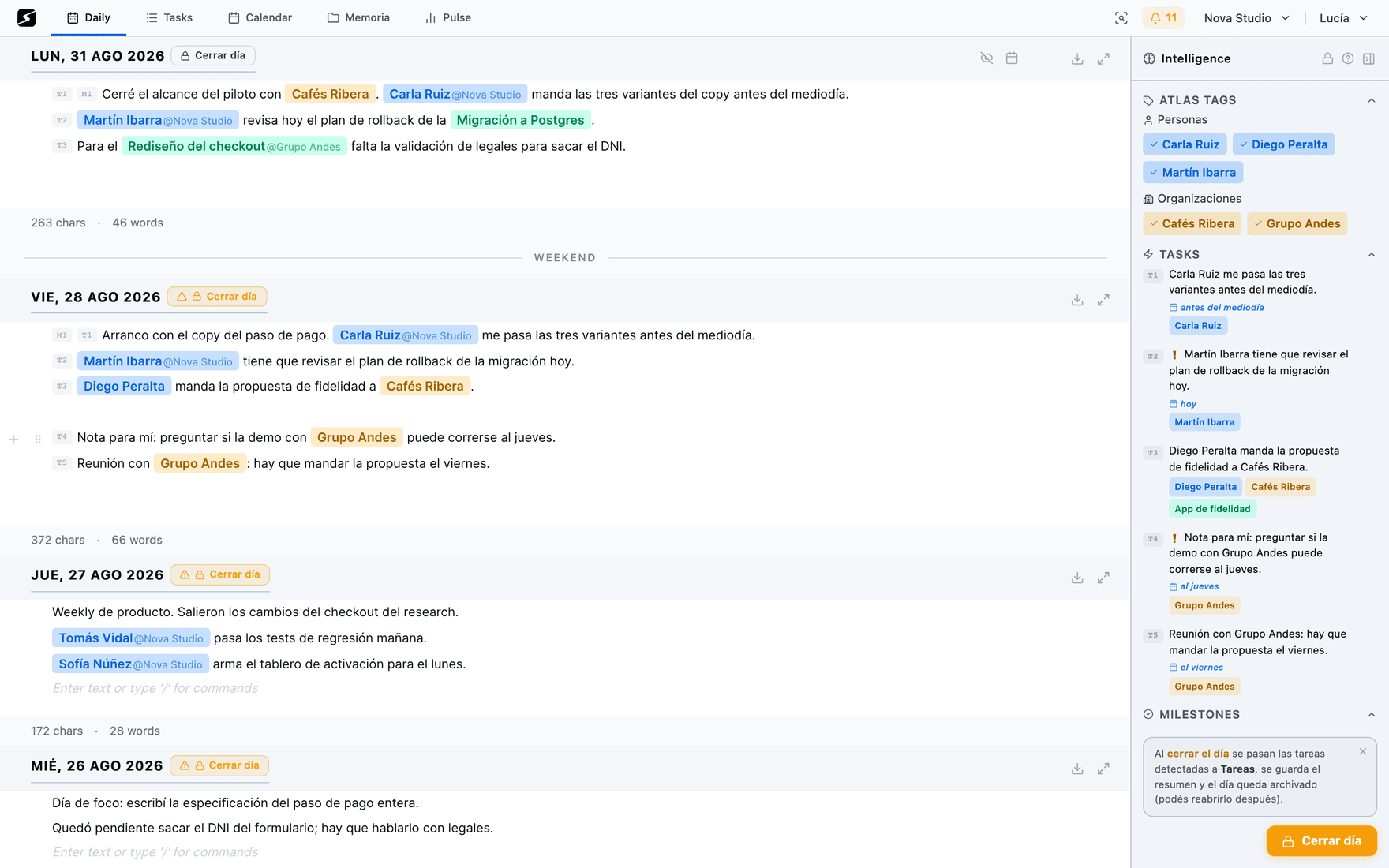
Bullets, outlines and indentation: the shape is the data
The editor is block-based, like the one in documents: bullets, numbered lists, checklists, headings and plain lines. For the analysis, the marker does not matter: what matters is what each line hangs from.
- A line with no bullet opens a topic. It is the heading: the client, the person or the project.
- A bullet is an item of that topic. With
-,*or•, with or without a space after the dash. - Indentation builds the tree: Tab pushes one level in, Shift+Tab pulls out. If you type fast, repeating the dash does the same —
--is two levels,---is three.
A well-formed note looks like this:
Acme
- meeting with Ana about the renewal
-- we have to send her the proposal on Friday
-- legal reviews the contract
- we decided to bill per milestone, not per hour

Internal
- finished the database migration
- pending: pick the release date
Why the shape matters this much
Every line is analysed on its own, but with its branch. If the client name sits once at the top and the bullets hang from it, those three lines already know who they are about. If instead everything runs together in a paragraph, each sentence is left with no context and you have to repeat the name in every phrase — which is exactly the double work the method exists to take off you.
The practical rule: one item per line, and the proper name once, at the top.
If you already wrote it all in one go, the Organize by topic pill on the bar under the note rewrites it into that shape — one line per topic, with the items hanging off it — without changing the text of the lines that are already tasks, and as long as you do not keep typing, Undo organizing puts it back as it was. It shows up once the note has a few lines, on the web and desktop; on the Free plan, twice a day.
Inheritance: every line is read with its branch
When a line goes out to be analysed it does not go alone: it goes with the full chain of its parents as context. The deepest bullet in the example above arrives as "we have to send her the proposal on Friday", with "Acme" and "Ana" hanging off it.
Three behaviours follow from that, and they are worth knowing:
- 1The parent's entities flow downThe person, organization or project sitting in the heading can be attached to the bullet's task, spelled exactly as it is written above. That is why the name goes in once, spelled right, instead of five times spelled wrong.
- 2A parent with real children becomes context"Acme open items" or "Ana, finish this week" do not become tasks: the real item lives in the bullets underneath, and the line above only groups them. Without this rule, every heading would leave you a phantom task with no object.
- 3Unless the children are parts, not items"Review the whole contract" with "section 3" and "section 4" underneath is still a task: the children are pieces of the same object, not independent assignments.
The criterion behind all of it: a task has to make sense without reading the bullets that follow it. If you need to look further down to know what to do, that line is context.
Predictive typing: your knowledge, as you write
From the third character on, what you are typing is matched against the names in your Atlas — people, projects, organizations and labels — and a small list appears next to the cursor. It matches aliases as well as the stored name, and it catches a word in the middle or a compound name: "Mari" offers you Mariana Falcón, "carlos cast" offers Carlos Castro. Enter or Tab inserts it, and on closed days it never appears.
Why it pays to always accept it
What it inserts is the name exactly as it was saved on its entry, with its accents and its casing. That is what makes the mention hook into the entry that already exists instead of proposing a near-identical new entity: "Mariana Falcon" and "Mariana Falcón" are two separate entries, and the same person to you.
The app does try not to leave you duplicate entries over a half-typed name, but nothing is as cheap as accepting the suggestion with Enter.
The same box shows up in documents, where it also completes formula variables when you type {{. See Memory and documents.
What the note understands
What gets flagged as you write · Hobby
Detection runs on top of what you write without touching it: it lays flags over your text, it never rewrites it.
Every line with content falls into one of four classes, and the first three leave a numbered flag over the text:
| Flag | What it is | Example |
|---|---|---|
| T | A future action: an obligation, an intent or a commitment not executed yet. | "we have to send her the proposal on Friday" |
| D | A decision, a criterion or a definition already made. | "we decided to bill per milestone, not per hour" |
| M | A milestone or a status: something that happened or is under way. | "finished the database migration" |
| — | Context: headings, loose titles, unanswered questions. | "Acme open items" |
Whatever you want to be a task, a milestone or a definition without depending on detection, you mark yourself: the / → Mark as menu has Task, Milestone and Definition (and Reminder, further down). That line carries its flag from the moment you write it, and detection does not change it.
On top of the T flags a second one can show up, in amber: the warning that this task, read on its own a week from now, will not be understood. How it is scored and what it is for, in the next section.
In parallel, the panel on the right builds the labels of the day: people, projects, organizations and free labels, each linked to its Atlas entry. When a name it does not recognize shows up, it asks — who is "Ana"? — and you resolve it by linking to someone who already exists or creating them right there.
Everything is reversible before you close:
- The crossed-out eye dismisses a task, a decision, a milestone or a label. It stops counting for the close, and your text stays intact: what was surplus was the flag, not the line.
- Whatever you dismissed collects under Skipped, and comes back with one click.
- What is already confirmed in the Atlas beats what detection guessed: if "Acme" is stored as an organization, it will not be treated as a person because one sentence made it look like a name.
The vagueness score: will it still make sense in a week
A task written in the note lives two lives. In the note it is surrounded by everything that explains it: the line above, the project it hangs off, whatever you were writing. On the board it is on its own, one line among eighty, three days later. "Finish it on Wednesday" makes perfect sense while you are writing it and none at all when you read it loose — and by then there is nobody left to ask.
So every line flagged as a T also gets a score for the clarity of the action, which answers one question: is it clear what to do and about what? It does not look at whether the task matters, whether it has a date or whether it has an owner — all of that gets assigned later, at any point, and nothing is lost by not having written it in the note. What had to be done is the one thing you cannot recover.
| Clarity of the action | When | Example |
|---|---|---|
| Clear | An action verb and a concrete object: someone else could pick it up and do it without asking which one. | "send Ana the closing report" |
| Half there | There is an action, but the object is generic: you can tell the kind of work, not which one specifically. | "put the proposal together" · "review the numbers" |
| Not clear at all | The object is a pronoun or missing: the line only says when or who. | "finish it on Wednesday" · "keep going with that" |
A date or a proper name do not raise the score on their own: "finish it on Wednesday" still does not say what, and neither does "the Acme thing, pending". What raises it is having written the object of the action.
That score is crossed with a second thing, the anchor: whether the line hangs off a person, a project or an organization — its own, or inherited from the parent line. If it does, you will have something to pull on to reconstruct the rest. It is not a requirement: it is a mitigating factor.
| Clarity of the action | With an anchor | No anchor |
|---|---|---|
| Clear | No flag | No flag |
| Half there | No flag | Vague |
| Not clear at all | Vague | Very vague |
A clear task with no project and no person never carries a flag: that is half the tasks in any note, and flagging them would turn the warning into wallpaper. The flag goes amber — yellow for the mild one, burnt orange for the severe one — and never red, which on the task list already means "urgent": two different warnings, and one task can carry both.
What it is for: it warns you while you still have the context
The warning fires while you write, which is the only moment when fixing it costs one line: the note that explained it is open and the missing detail is still in your head. A week later that same correction is an investigation — and what usually happens is not that it gets corrected, it is that the task gets abandoned.
That is why it travels with the task: you see it next to the T1 in the note, it is still there on the closing screen — the second cheap moment to rewrite it — and it is still there when the task shows up loose on the board.
And it does nothing beyond warning: it does not block the close, it does not rewrite your text and it does not create anything on its own. You fix it by rewriting the line, not by ticking anything.
Why this is part of the method and not an app detail: a vague goal performs like "do your best", which is the worst instruction of the lot. It is in Capture, in the framework.
How it reads time
Dates are read in plain words and resolved against the day of the note, not against today. That is what keeps reopening last Friday's note on a Tuesday from shifting every date: "Monday" in that note still means the Monday after that Friday.
| You write | It is understood as |
|---|---|
| today · now · tomorrow · the day after tomorrow · yesterday | The day of the note, plus or minus the days it takes. |
| on Friday · next Monday · this Thursday | The next time that weekday falls after the note's date. |
| last Monday · last week · 3 days ago | Backwards. It is context for something that happened, not a due date. |
| next week · in 2 weeks · in 10 days | The note's date plus the term. |
| November 15 · 12/11 · 12-11-2026 | The literal date; with no year, the next time it comes round (this year or, if it has passed, next year). |
A date sitting in a line flagged as a task becomes its due date. After that there are two ways to change it without rewriting the line: drag the provisional task onto the calendar — that date overrides the one in the text — or set it while closing the day, with the +1, +3 and +7 day shortcuts.
Two details that prevent surprises: time words ("Monday", "week", "yesterday") are never taken as entity names, and a task's urgency — overdue, today, this week — is worked out in your local time.
Reminders: a line that also pings you
A date makes a task due on a day. An hour does something else: it makes something reach you at that moment, whether the app is open or not.
There are two ways to write one, and both count the same:
- With the
/→ Reminder menu, which writes the shape already built, rounded to the next half hour:⏰ 15:30 — llamar al contador. Change the time and the text and you are done. - By hand, in Spanish: "recordame mañana a las 9 llamar al contador". It understands clock times and also en un minuto, en dos horas or dentro de 3 días.
With no time there is no reminder: that is a task with a date, and everything above already covers it. The hour is exactly what creates something to announce.
The line is the source of truth
The other two halves come out of that line: a task with its time, and the scheduled alert. Editing the line changes both; deleting it cancels the alert, which is what anyone expects when deleting a line that said "remind me…".
The alert arrives as an app notification if you have it installed, and otherwise over WhatsApp, Telegram or email. Chat alerts are Hobby and up; the reminder itself works on every plan.
They can also be asked for over chat, without opening the note: see WhatsApp and Telegram.
From a flag to a labelled task
While the day is open, every line flagged T lives as a provisional task: it already shows up in Tasks, with the Provisional label and the days it has left, the labels it inherited from its branch and the date read from the text. What you can do with it there is in Tasks. If you already took care of it, tick it done from the panel or from Tasks, and closing the day creates it already closed.
Provisional tasks are saved to your account, so they survive a reload and look the same from your phone. They last seven days: if you have not closed the day by then, they drop on their own.
Closing the day is what makes them real, and it is a review screen, not a blind button:
- Everything in one list, with a chip per row saying whether it is a Task, a Definition or a Milestone: if it landed wrong you change it right there.
- Tasks and milestones get a date in one click, or stay undated. A task that is too big can be split into several with AI, and the ones that arrived flagged vague get rewritten here: it is the last moment when fixing them costs one line.
- Every task carries a question — And this one? — with four answers: Me (it will ask for a block of your week), Someone else (it reserves follow-up, not your time), Already done (it took two minutes and you dispatched it: it is born closed) and Drop it. That is what keeps the week from filling up with things nobody decided to do.
- If a similar task already exists, it shows up beside it with how similar it is — "87% Write the copy for the stamps" — so you do not duplicate it.
- Definitions and milestones need at least one label — person, project or organization — to be saved: with nobody to belong to they do not enter the Atlas.
On confirm, tasks are created with their labels and their date, definitions and milestones are recorded, new entities are registered in the Atlas and the day locks. You can reopen it whenever you want: the lock says the day is processed, it does not shut you in.
Today you close yourself. Past days left open close on their own, after midnight or the next time you open the app: it comes switched on, and you turn it off with Close the day automatically, in the workspace settings.
What happens to those tasks afterwards — how they group into deliverables, how they look by person or by project — is in Tasks and detection.
Seven rules for writing the note
- One item per line. Two commitments in one sentence come out as a single task.
- The proper name on top, once. Everything hanging off that line inherits it.
- Make the task stand alone. "Review the Acme contract" is a task; "review that" is a note to yourself for the next two hours. That is exactly what the vagueness score measures.
- Say the date in words. "on Friday", "next week", "November 15": they all resolve against the day of the note.
- Accept the suggestion with Enter. It is the difference between adding to an entry and creating a near-copy of it.
- Dismiss with the eye, not by deleting the line. What is surplus is the flag; the text is your record of the day.
- Close the day. It is what turns all of this into tasks, entries and reports: while the day is open, none of it exists yet.
Shall we try it?
Create your free account and use all of this today.